

My First Experience with Three.js

I was interested in Three.js for a long time. It was back in February when I saw Bruno Simon's 3D portfolio, where you drift through his projects and other information on a car. You should check it out afterwards if you haven't. It's amazing. At that time, I just got into learning Vue and I wanted to concentrate on getting more familiar with it than to start learning a new framework.
So a few weeks ago, I finally had time to get into Three.js. But on its own, it looked very complicated. So I checked out Trois.js. It implements Three.js into a more familiar environment of Vue.js. After some experiments, I got into brainstorming ideas. I've never done a form before, so I decided to go with this idea, but using Three.js make it more interesting for people to fill out.
With the goal set, I warmed up to the idea of having a Mystery Box which would have a form element on each side and when you fill out one side it would go to the other, until you've completed it and the box would open revealing something interesting. I had to scrap this idea after understanding that it would be pretty difficult to project a 2D element on a 3D element in the way that would look good. But I decided to stick to this topic and here's what I did.
After using my favourite research buddy Google, I found a Lucky Block model on the internet which I decided to implement beside my form. And let the camera rotate around the z-axis of the block, but to make it more interesting, I added some variables which would multiply its rotating speed by looking at how many form fields were filled out.
<template>
<GltfModel src="../../assets/LuckyBlock.glb" :visible="LBvisible" />
</template>

<script>
data() {
    return {
        t: 0.2
    }
},
props: {
    LBvisible: Boolean,
    speed: Number
},
mounted() {
    setInterval(() => {
        this.t += this.speed * 0.01
    }, 10)
}
</script>
To not waste any time designing a form, as the main target of the project was getting more familiar with Three.js, I found an existing form design on Figma (The Perfect Input Field Kit) which I then implemented into the website.
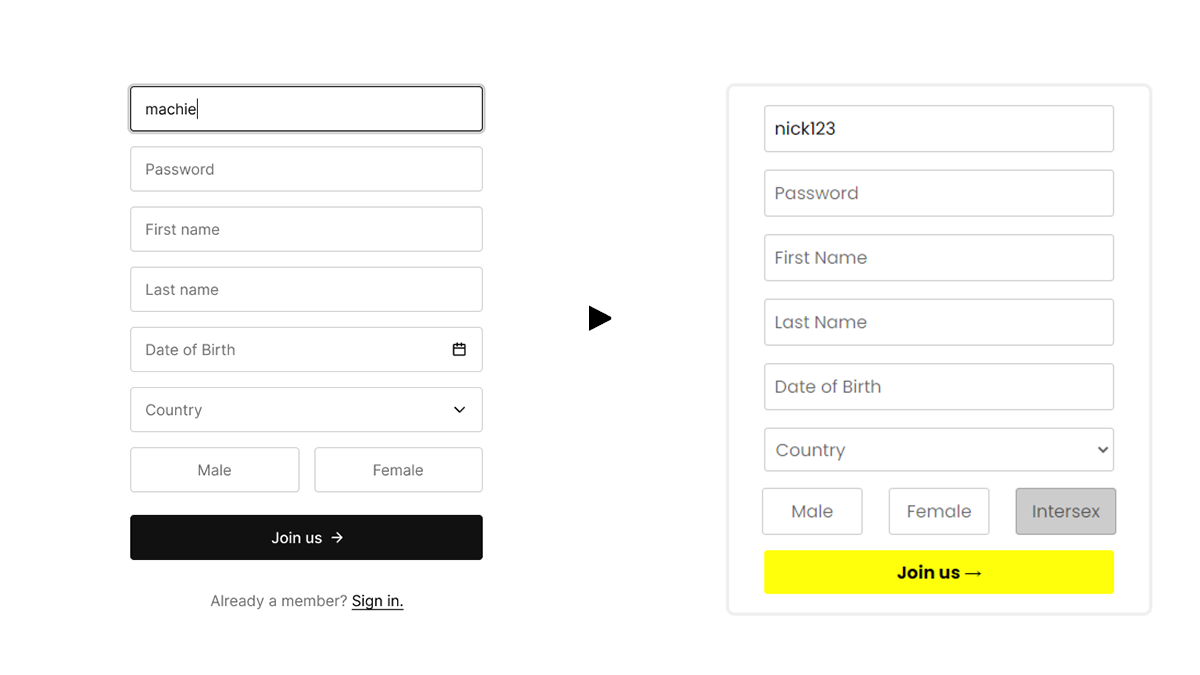
Afterwards, I assigned an event (keydown for typing inputs and change for selection inputs) to each input element in the form. Like that, I could check if the field was filled or not and speed up the rotation of the block accordingly.
Now the only thing was to add a reward that would appear out of the block. I decided to go with a cake model I found on the web. I added a simple animation which would:
Shrink the block (aka zoom out the camera)
Replace the block with the cake
Enlarge the block (aka zoom in the camera)
Here's how it works:
onSubmit() {
    const zoomOutInterval = setInterval(() => {
            // Enlarge the distance between the object and the camera
            this.radius += 4
    }, 10)

    setTimeout(() => {
        clearInterval(zoomOutInterval)
        // Set the rotation speed of the camera back to normal
        this.speed = 1
        // Hide the Lucky Block
        this.LBvisible = false
        zoomIn()
    }, 1000)

    const zoomIn = () => {
        const zoomInInterval = setInterval(() => {
             // Shrink the distance between the object and the camera
            this.radius -= 4
        }, 9)

        setTimeout(() => {
            clearInterval(zoomInInterval)
            // Correct the distance
            this.radius = 13
        }, 1000)
    }
},
Besides the block, the form disappears as well. Instead, you can see a little message which thanks the user for filling out the form, nothing extraordinary.
I still have some issues with the loading time for my models, which take approximately 2-3 minutes (differentiates upon the internet connection) to load. So besides the link to the website, I'll also leave a little clip which shows all the possible interactions with this website, so you don't have to wait an eternity. 😅
You can check out the website here 👉 Lucky Form
You can check out the code here 👉 Lucky Form (Code)
Finally, I just want to add that I really like this technology and I see myself using it in the future, especially for projects where 3D models are necessary. Although this technology is still fairly new and there are not a lot of good tutorials on the internet, the documentation is clear and helpful.
Thanks for reading! ♥
If you like this article, consider following me on Twitter. I post tips around web development and progress on my projects. If you have any questions, my DMs on Twitter are always open.

About the author
I'm a self-taught web developer. I occasionally post summaries of my projects and what I learned from them. Thanks for tuning in! ❤
Comments
Join the discussionNo comments yet. Be the first to comment.


